
Dee4Life’s members’ portal is the place to manage your membership and view any Trust documents.
To access the portal, please follow the steps below.
On any page on the Dee4Life website, click on the ‘Member login’ option on the top navigation bar.
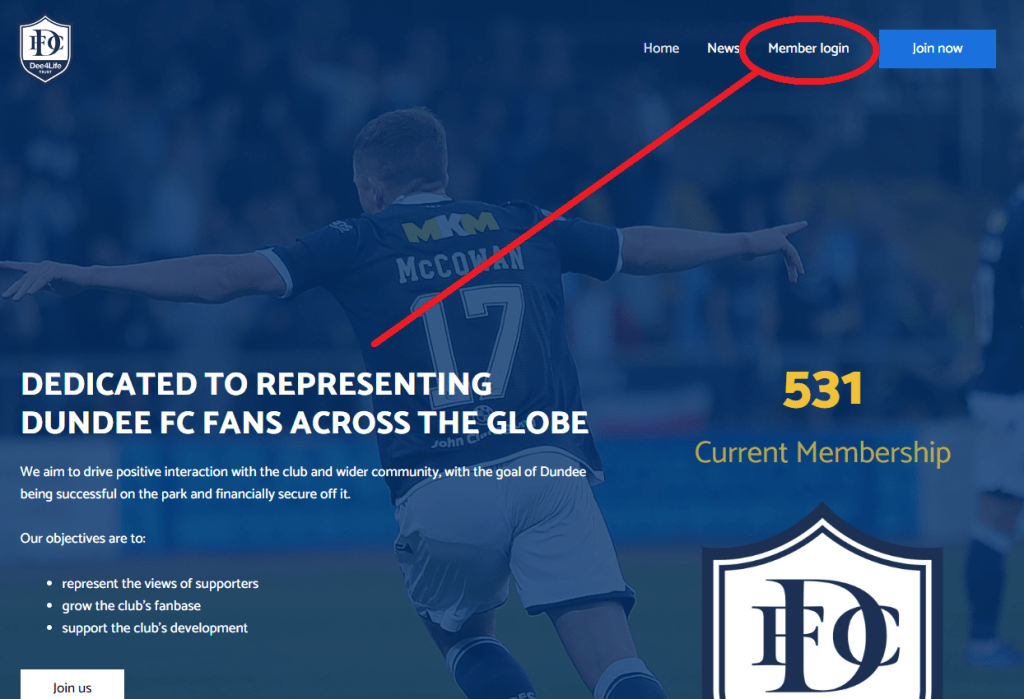
This will open up a login page to our members’ portal.
To access Dee4Life documents, you will need to register for an account with our system – this is called Sheep CRM. All members should have been given the opportunity to do this when they first joined Dee4Life.

This initial page gives you the option to register for a Sheep CRM account, login to an existing account, become a Dee4Life member or give your consent for data recording.
If you have already registered, please skip to the next step.
To register, click the ‘register your account’ link and input your first name, last name and email address and phone number you used for signing up with Dee4Life.

Click the box to agree to the Sheep CRM terms and condition then click the ‘register’ button. This will then send an authentication email to your given email address. Follow the instructions on in this email to complete your sign up.
If you have previously registered for a Sheep CRM account, select the ‘Click here to log in’, option.
This will open a page asking you to input your email address. Please note, this should be the email address associated with your membership.

Type in your email address and password into the text box, then click ‘CONTINUE’. If you have input the correct credentials you will be logged in. If not, you will be prompted to try again.
There is also the option to reset your password if you have forgotten or to input an activation code, if you have been sent one.
Once you have logged in, your will see the members’ portal page. Here you will be able to manage your information, membership and find Dee4Life documents.

To find documents such as meeting agendas and minutes, click the ‘Documents’ option in the top right of the screen (circled on the image above).
Upon clicking ‘Documents’ you will then see a list of document categories. To download any document, click on one of the categories to open up the library of files.

Click the ‘Download’ option to the right of the file (circles on the image above) to download a copy to your device. You can also click on the name of the file for more information on it.
To return to the main portal page, click the ‘Dashboard’ button at the top right of any page.
If you experience any difficulties in accessing the members’ area, please don’t hesitate to get in touch by emailing contact@dee4life.com.

 Dee4Life